Wednesday, January 7, 2009

How to restore when wrong passcode disables your iPod Touch or iPhone

As you know iPhone and iPod touch allow you to set a passcode to be entered when powered on or when the wake button is pressed. And when you enter the wrong passcode you'll see a screen that says "Wrong Passcode, try again." If you enter the wrong passcode too many times, you'll see a message that says "iPod is disabled" and to try again late. The screen on the iPhone will read as "iPhone is disabled."

If you repeatedly enter the wrong passcode, iPhone or iPod touch will be disabled for longer intervals, before you can try again. After too many unsuccessful attempts, you won't be able to try again until you connect to the computer you normally sync with. Show me more...

Note that starting with iPhone 2.1 software, there is a setting to cause the device to erase itself after 10 consecutive incorrect password attempts. This setting is off by default. It can be turned on by tapping Settings > General > Passcode Lock after you enter a correct passcode.

If you cannot remember the passcode, you will need to restore your device on the computer that was used to originally sync the iPhone or iPod touch so that you can reset your passcode and resync the data from the device (or restore from a backup).

If you restore on a different computer that was never synced to the iPhone or iPod touch, you will be able to unlock the device for use and remove the passcode but your data will not be present.

Restoring your iPhone or iPod touch

Restoring your device will erase all data from your iPhone or iPod touch, including songs, videos, contacts, photos, calendar information, and any other data. All iPhone or iPod touch settings are restored to their factory condition.

Whenever you restore your iPhone or iPod touch, Apple highly recommends that you perform a sync prior to restoring in order to back up any changes since your last sync. If you have movie rentals on the device that you haven't finished watching, restoring using iTunes will delete the movie rental and will not be recoverable.

Use the following steps to restore your iPhone or iPod touch:
  1. Make sure you have the latest version of iTunes installed and running before attempting to update.
  2. Connect your iPhone or iPod touch to your computer.
  3. Select your iPhone or iPod touch when it appears in iTunes under Devices.
  4. Select the Summary tab.
  5. Select the Restore option.
  6. When prompted to back up your iPhone or iPod touch's settings before restoring, select the Back Up option. If have just backed up the device, it is not necessary to create another.
  7. Select the Restore option when iTunes prompts you (As long as you've backed up your device, you should not have to worry about restoring your phone).
  8. Once the restore process has completed the iPhone or iPod touch restarts and displays the Apple logo while starting up. NOTE:For the iPhone only, after a restore, the iPhone displays the "Connect to Activate" screen. During this period you must continue to keep your device connected to complete activation and make sure you are connected to the internet.
  9. The final step is to restore your iPhone or iPod touch from a previous backup. So on the setup screen select the back up you want for your iPhone or iPod touch and select the Continue button in order to complete your device's restoration.

Tuesday, January 6, 2009

iTunes songs are now DRM-free and will cost only 69 cents

At Macworld Expo today, Apple's Phil Schiller announced that apple has signed agreements with all the major music labels to offer their music in a DRM-free format on the iTunes Store. Like prior iTunes Plus tracks, all music will now be sold in DRM-free, 256kbps AAC format. All free of burn limits and digital rights management (DRM). So iTunes Plus music will play on iPod, Apple TV, all Mac and Windows computers, and many other digital music players.
Show me more...
Currently, 8 million tracks are available as DRM-free iTunes Plus songs, with 2 million more DRM-free songs slated to become available by the end of the quarter. That will make all of iTunes' 10 million tracks DRM-free, the largest music store library on Earth. Apple will also offer an easy upgrade for users to the new iTunes Plus tracks.

Apple also announced the new capacity for iPhone 3G users to download songs over the 3G mobile network, in addition to the WiFi downloads that were formerly the only way to access iTunes from the mobile. There is no extra charge for downloading tracks over the mobile network, as there is with some other services.

Starting in April 2009, studios will be able to release songs on iTunes at three different prices: 69 cents for back catalog tracks, 99 cents for standard songs, and $1.29 for new or popular releases. Apple has staunchly resisted multiple track prices in the past in order to keep music in iTunes priced simply and consistently. Music labels have just as stubbornly pushed for multiple pricing tiers.

Apple patents iPod touch and iPhone friendly gloves

Addressing the complaints of nearly every iPhone owner in a northern climate, Apple has filed for a patent that would cover a means of using a multi-touch device with gloves.

As cold-weather users of the iPhone or iPod touch may already know, the devices’ capacitive touch screens don’t work with most insulated gloves, as they block the electrical response needed to operate the screen.

Apple’s patent filing describes a pair of gloves with a second inner layer that would simulate the electrical feedback of human fingers, and matching openings on each fingertip to allow the inner layer to be exposed when in use. As with all Apple patents, this filing does not necessarily represent any future product release from Apple, but offers evidence of the company’s research in this area.

Tuesday, December 30, 2008

Larger iPod Touch with 7 or 8 inch screen to be released

TechCrunch is reporting that a large screen iPod touch device could be released in the Fall of ‘09, with a 7 or 9 inch screen. TechCruch claims that it got this news from three independent sources close to Apple. In fact one of the sources has even held one of these devices.

After the release of the App Store, millions of games have been downloaded on to the iPod Touch turning it into a gaming console. So I would not be suprised to see an iPod Touch with a larger screen in future. What do you think??

Tuesday, December 23, 2008

Apple has winning (iPod) touch in festive sales this holiday season

"Apple, with its iPod touch, appears a clear winner this holiday season as US consumers shop for smaller, cheaper, more versatile electronics," Chris Nuttall and Richard Waters report for The Financial Times.

While the Consumer Electronics Association predicts flat fourth-quarter sales compared with a year ago, analysts report Apple stores have been the busiest among electronics retailers.

iPods, historically responsible for 40 to 50 per cent of Apple's fourth-quarter revenues, are selling in the biggest numbers.

Google has reported that after Nintendo's Wii games console and Wii Fit game, iPod touch has been its most searched for product, while the Lycos search engine has "iPod" as its top search.

Amazon's electronics has the 8GB iPod Touch as its most popular in its bestseller list with six iPods in its top 20. This list including all versions of the iPod Touch. The lowest prices for the Touch still being $230, Michael Gartenberg, vice-president of Mobile Strategy at Jupitermedia, says this is not putting off cash-strapped consumers.

Thursday, December 18, 2008

Contour iSee iPod Touch 2G Cases


The iSee is as pure as a case can get - crystal clear, lightweight, and extremely durable, all while prominently displaying the iPod touch.
Show me more...
At 0.8 oz, the iSee will neither be seen nor felt, but it will protect. Oh, will it protect. Made of crystal clear polycarbonate plastic, the iSee will prevent all sorts of dings and scratches but never draw attention away from the touch.

So enjoy rock solid protection along with full access to all of the controls because the iSee is the best case you'll never know is there. Available now, the iSee iPod touch 2G from Contour sells for $29.95.

Easy Access
Don't sacrifice protection for functionality. The iSee offers both with complete usability of all the controls.

A Clear Case of Protection
Keeping your touch pristine isn't enough. We want you to see just how good it looks too.

Efficient Design
With a simple 2-piece design, inserting the touch is a snap. Put it on the rear plate and press both halves together.

Also check out the Contour Flick iPod Touch 2G Cases

Tuesday, December 2, 2008

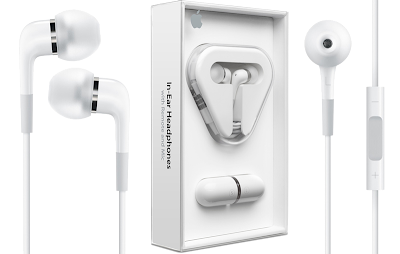
Apple In-Ear Headphones with Remote and Mic

Apple this week began accepting orders for a pair of new headphone options designed for iPods, nearly three months after the accessories were first announced at a September media event.

The Apple online store is now reflecting availability of the $79 Apple In-Ear Headphones with Remote and Mic within 7-10 business days, while the $29 Apple Earphones with Remote and Mic carry a 3-4 week wait, and thus may not ship in time for the holidays.
Show me more...
One of the biggest draws of the new headphones is their ability to facilitate audio recording on the latest generation of iPods without any bulky attachments. Unlike previous generation iPods, the models introduced in September -- the fourth-gen iPod nano, second-gen iPod touch, and revised iPod Classic 120GB -- all feature audio input through the fourth connector of the headphone jack like the iPhone.

Features:
Two drivers in each earpiece.
Each earpiece contains two separate high-performance drivers — a woofer and a tweeter — resulting in rich, detailed, and accurate sound reproduction and amazing bass response for all types of music.

Impressive sound isolation.
Choose from three sizes of soft, silicone ear tips for a comfortable, stable fit. When inserted in your ear, they create a seal that blocks outside noise so you can get the most from your music.

Control your iPod.
The control capsule located on the cable of the right earpiece includes a microphone and three buttons. Here's what you can do with this convenient remote:
-Adjust volume by pressing the + and - buttons.
-Control music and video playback — including play/pause and next/previous — by pressing the center button.
-Record voice memos on supported iPod models.

Steel mesh caps for protection.
Stainless steel mesh caps protect the precision acoustic components from dust and debris. You can remove the caps for cleaning or replace them with an extra set that's included in the box

What’s in the Box
-Apple In-Ear Headphones with Remote and Mic
-Carrying case
-Three sets of silicone ear tips (small, medium, large)
-Two replacement mesh caps

Technical Specifications
-Frequency response: 5Hz to 21kHz
-Impedance (at 100Hz): 23 ohms
-Sensitivity (at 100Hz): 109 dB SPL/mW
-Drivers: Custom two-way balanced armature (woofer and tweeter in each earpiece)

Compatibility Information
The remote and mic are supported only by iPod nano (4th generation), iPod classic (120GB), and iPod touch (2nd generation). Audio is supported by all iPod models.
◄ Newer Post Older Post ►
 

Copyright 2011 ipod touch cases is proudly powered by blogger.com | Design by Tutorial Blogspot Published by Template Blogger